Sentence lengths
ests.visualizers.sentence_lengths_plot(), ests.visualizers.sentence_lengths()
Description
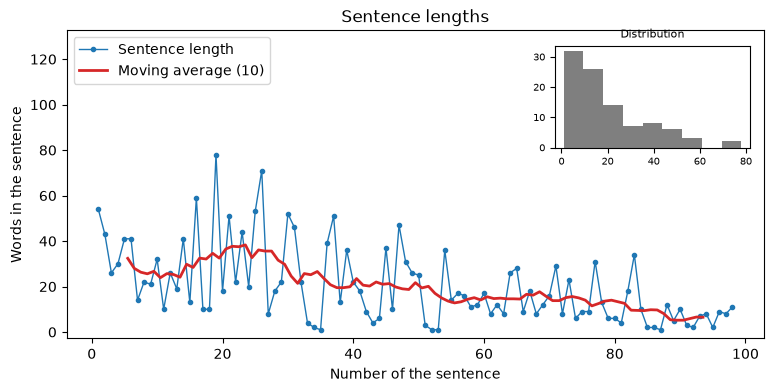
The curve of the lengths of the sentences - the rhythm of a text: the length of every sentence in words in order, the moving average over a window of window sentences and an inset with the histogram of the lengths. Short and long sentences in turn are an editorial sign of a lively text, a flat curve - of a monotonous one. sentence_lengths extracts the lengths: the sentences of a string come from SentsExtractor by the same rules - the inverted marks, the dashes of a dialogue, the abbreviations - and a word belongs to the sentence it starts in; the sentences of a Doc come from its boundaries (without them, from its text); ready lengths - any sequence of integers, a numpy array and a Series included - are used as they are; sentences without words are skipped. The function takes the axes ax and returns Axes.
Parameters
| Parameter | Type | Default | Description |
|---|---|---|---|
source |
str/Doc/Iterable[int] | - |
Text, Doc object or lengths of the sentences (a list, a numpy array, a Series) |
window |
int | 10 |
Window of the moving average in sentences |
inset |
bool | True |
Show the inset with the histogram |
ax |
Axes | None |
Axes for the plot |
Usage example
The second window of 2000 words of Niebla by Unamuno from Project Gutenberg.
Example
Code:
from urllib.request import urlopen

from ests.corpus import split_windows
from ests.visualizers import sentence_lengths, sentence_lengths_plot

url = "https://www.gutenberg.org/cache/epub/49836/pg49836.txt"
text = urlopen(url).read().decode("utf-8")
text = text[text.index("\n", text.index("*** START OF")) : text.index("*** END OF")]
chapter = split_windows(text, 2000)[1]

sentence_lengths(chapter)[:5]
# [54, 43, 26, 30, 41]

sentence_lengths_plot(chapter, window=10)
Result: