Word tree
ests.visualizers.wordtree()
Description
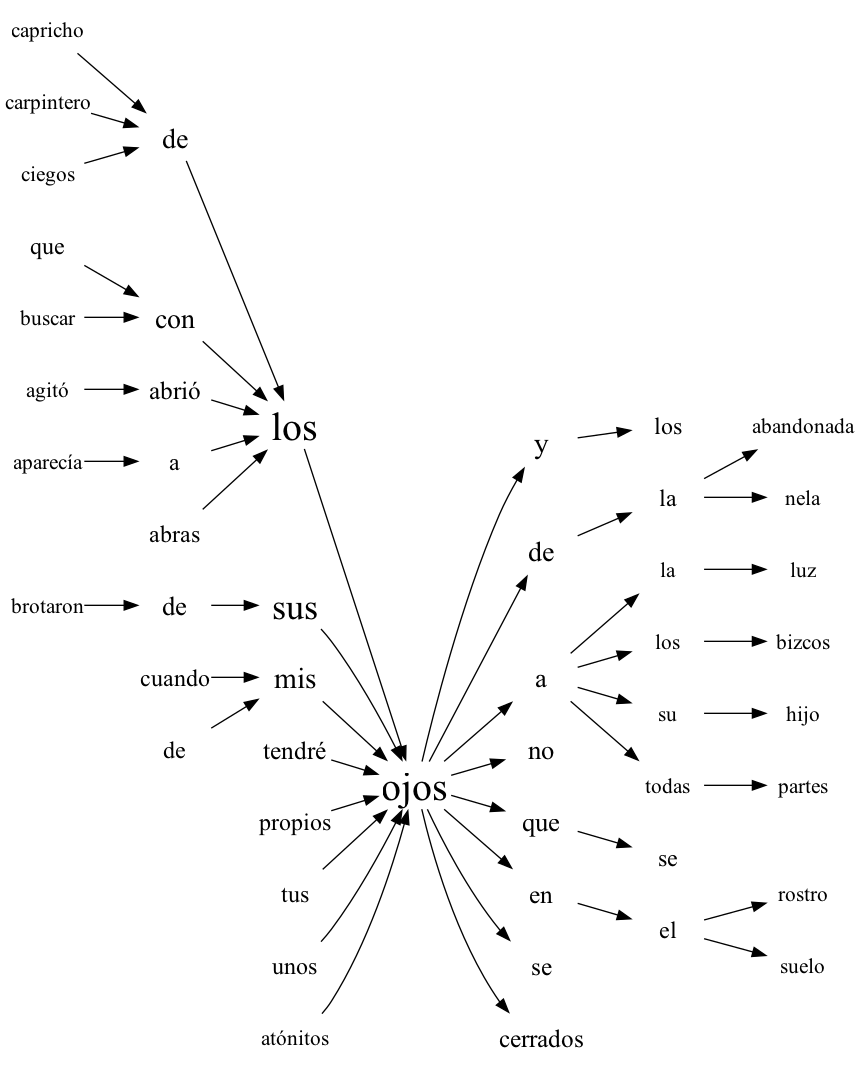
Building a word tree that shows the contexts of a keyword in a text: the N-grams of up to max_n words that start or end with the keyword are counted in every list of words - a sentence, for instance. On each side the sizes are taken in ascending order, and among the N-grams that continue a kept shorter one the most frequent max_per_n are kept, alphabetically when equal, so every level of the tree holds at most max_per_n words and every branch continues a kept one. The kept N-grams are joined into two trees, the words after the keyword and before it, with the size of the font by frequency; the words are only the labels of the nodes, so a colon or a hyphen in a word is safe.
Note
The word tree is described in detail in this paper.
Parameters
| Parameter | Type | Default | Description |
|---|---|---|---|
texts |
list[list[str]] | - |
List of lists of words |
keyword |
str | - |
Keyword whose contexts are shown |
max_n |
int | 5 |
Largest size of the context |
max_per_n |
int | 8 |
Largest number of examples for every size of the context |
**kwargs |
- | - |
Drawing parameters: max_font_size (default 30), min_font_size (12), font_interp - a function interpolating the size of the font from the frequency |
The function returns a Digraph of graphviz.
Usage example
The sentences of Marianela by Galdós from Project Gutenberg.
Example
Code:
from urllib.request import urlopen

from ests import SentsExtractor, WordsExtractor
from ests.visualizers import wordtree

url = "https://www.gutenberg.org/cache/epub/17340/pg17340.txt"
text = urlopen(url).read().decode("utf-8")
text = text[text.index("\n", text.index("*** START OF")) : text.index("*** END OF")]

we = WordsExtractor(lowercase=True)
sentences = [we.extract(sentence) for sentence in SentsExtractor().extract(text)]
graph = wordtree(sentences, "ojos", max_n=4)
graph.render("wordtree", format="png")
Result:
Warning
Rendering the tree needs the executables of Graphviz.